Time & threads
March 2026
At the start of this month, I've fixed a large number of bugs that have been on my radar for a while, and I've restructured some systems to make them simpler and more robust.
For a while, the game loop wasn't implemented very nicely. The game loop is the code that makes sure the game produces sixty frames per second (or whatever your monitor supports), while also updating the game at a constant rate. This can be a challenge, because both these frequencies can vary wildly on different systems, and motion across frames still needs to look smooth.
Koi farm 2 uses multithreading in many ways. Modern devices have processors with many cores, and it'd be a shame if the game lags because it tries to do everything on one core while the others are idle, which is a common performance bottleneck for modern games. The game runs on three thread categories:
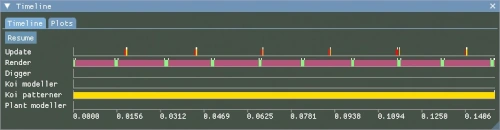
- The update thread runs at a constant rate, regardless of the machine it runs on. This thread updates the game state, which mostly means all moving objects in the world.
- The render thread runs at whatever refresh rate the screen has. It's 60Hz on my monitors, but refresh rates can be much higher nowadays, and if you crank the graphics settings all the way up you may get slower irregular frame rates as well.
- Procedural content is always generated on separate low priority threads, since this work is very slow but not time-critical. We can wait for it, but it shouldn't interfere with gameplay. I'm using several threads for these things, so koi models, koi patterns and plants can all generate at the same time without interrupting the main threads or each other.
- The audio engine runs on its own thread as well to prevent audio stutters.
The image shows thread activity. Left is the most recent work, this shifts to the right as time progresses.
- The yellow bars on the update thread update the game state. The test environment has 40 koi, so not much is happening yet, this is very fast.
- Immediately after each update, a red bar can be seen, which sends the updated state to the GPU for rendering.
- On the second line, the render thread can be seen. Green bars show when the game tells the GPU what to render.
Updates and rendering don't interfere with each other. This is great for performance. Imagine you have thousands of koi in the world, but your refresh rate is much higher than the games update rate (which is 41Hz at the moment). In that case, an update can take several frames before synchronizing and moving on to the next one. By running updates and rendering on different threads, your framerate can still be high while either thread can use 100% of a CPU core before things start to slow down, and neither are slowed down by background work like procedural generation.
The only time the main threads meet is during synchronization (the red bars), which need to happen after every update, but never while a frame is still rendering, because it could overwrite data that's currently being sent to the GPU. After every update, the update thread waits until no frame is rendering, it blocks the render thread temporarily while synchronizing, after which both threads may continue.
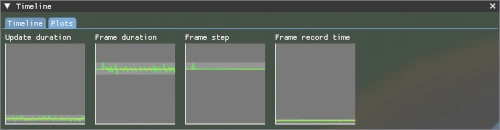
The second image shows plots that highlight another problem the game loop needs to tackle: time measurements and frequency measurements are inherently inaccurate. The GPU is a separate piece of hardware from the CPU, and while I can time things very accurately on the CPU, the GPU is doing its own thing, and it's not telling me precisely what's going on. The render thread interpolates between updates: a koi moves from position A to position B between two updates, and the frames between the updates interpolate from A to B. At high refresh rates, there may be many frames between every set of updates. The interpolation between these updates should progress smoothly.
The second plot in the image however shows the duration of each frame that I measure, and it's not a smooth line. On some GPUs, it's even rougher. If I interpolate according to those frame times, motion becomes choppy. If I take the rolling median of frame duration, it will stabilize around the actual monitor refresh rate. This is a number I can never get directly, but I can still find out what it is by keeping plenty of measurements and observing them. The third plot shows the actual interpolation step size between frames, which is now very flat, as it should be.
The small spike in interpolation step size can be explained: sometimes the render thread predicts that it's interpolating between states A and B, while state C is already synchronized. I'm only storing two states, so that means it needs to step slightly ahead to interpolate between states B and C instead.
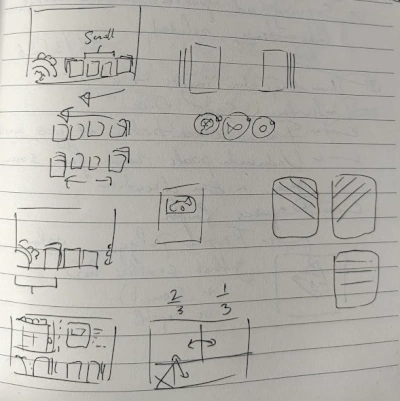
It's also high time to implement the card system, which will be the backbone of the entire interface. In Koi Farm 1, koi can be turned into cards and vice versa, and cards can be stored for later use. Collecting koi with specific properties as cards would unlock more challenges, and cards can be exchanged with other players.
Koi farm 2 will build on this system in several ways:
- Not just koi can be turned into cards, but also plants and items: everything that can be stored and moved into or out of the world will be a card.
- Card storage will be unlimited, and the player will be able to organise cards in their own way by creating named folders. Useful features like sorting by certain properties will be provided to make card hoarding easier; hoarding is very common in Koi Farm 1, players might as well do it responsibly.
- There will be more ways to interact with these cards. They can be in a "hand" (at the bottom of the screen) and in storage, but they can also be inspected up close to see more details about the fish. Cards can also be compared to spot the nuanced differences between different specimen.
- The cards will be beautiful. Their design will communicate things like rarity, special properties and the type of specimen in it. Cards will be 3D, which allows me to create effects like bending, koi jumping out of the frame and holographic effects. I'm working with a concept artist to design them next month.
The game now also runs in fullscreen mode, and it can be paused at any time. The Wwise audio engine now builds with the game, so we can soon start adding the first sound effects with the audio designer.