Terrain detailing
November 2025
Before adding more complex plants and objects to the scene, I want to develop my terrain system a bit further. The current system is just a flat plane with a single color in which ponds can be dug. I need the following features:
- Elevation (above as well as below the height ponds are at).
- Colorization and texturing. It's really important that plants aren't just planes sticking out of the ground, because it looks messy and fake. The colors of grass and plants need to blend into the terrain seamlessly.
- A level of detail system similar to water, which ensures that enough detail exists when zooming in to a patch of ground, while not wasting processing power for distant hills.
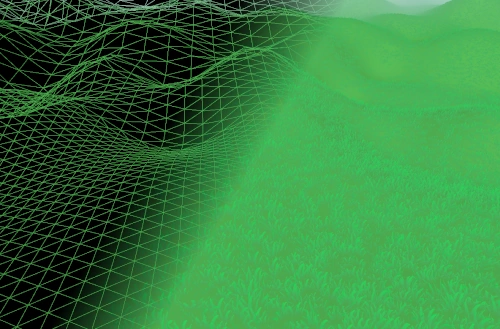
The entire terrain surface was a scene sized quad up until now, but I need tessellated tiles to render hills. Because water tiles and ground tiles have the same size that both need to vary in their level of detail, I've used the water tessellating system to render ground tiles. A heightmap is generated for every scene and rendered to a texture, and the terrain reads that texture when rendering to displace terrain.
Because the terrain can now take any shape, I also have to calculate the surface normals for lighting. I calculate them from the heightmap and store them in a texture, which is sampled when rendering terrain and when rendering plants. Plants need these normals in order to blend into the terrain, since the base of each plant needs to be lit in the same way as the terrain under it.
With heightmaps, scenes are no longer simply squares that can be dug out. I've created a map class, which contains all information required to construct a scene:
- The size of the scene.
- The heightmap, or a recipe to procedurally generate it.
- A random seed that's used to procedurally place the initial objects.
- The allowed area the player can build in (which is usually every flat part of the heightmap).
Maps will probably be extended later with things like scenery, unlockable areas and things like weather options. Maps configurations can be stored, loaded, generated and randomized. While I'm not exactly sure how maps will be editable and usable by the player, I'm sure the system will come in handy in the future.
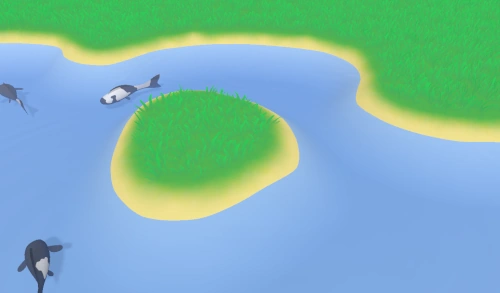
The terrain should behave like a chameleon: it takes the color of things that exist on it to make them blend in. If there's a patch of grass, the terrain needs to be green in that area, and the ground under rocks or statues should be sand or rock colored. To do this, I've created a texture that spans the entire area in a scene. When the objects on a patch of ground change, that part of the texture is cleared and re-rendered by rendering a colored flare (a splat) at the location of each object. Grass models would for example render a green flare under them. Later, when grass is rendered, the lower part of the grass model takes its color directly from the terrain texture, while it fades towards its own color as the model extends higher above the ground.
This system creates a kind of feedback loop that matches the ground and the objects on it to each other:
- An object is placed,
- the ground texture in the area the object is placed in will be cleared,
- for every object in that area, a colored flare is rendered,
- and finally, when the object renders, it fades towards the terrain texture color where the object intersects the terrain.
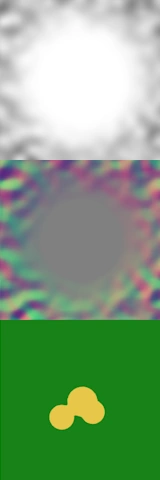
The image above shows the three textures I'm currently using to render terrain:
- The heightmap.
- The normal map, which stores the X and Z components of the normal vector. The Y component can be reconstructed programmatically.
- The colorization, which is currently still quite simple.
These new features give me some of the tools I'll need to make koi farm 2 pretty, but there are still some things that can be improved. The ground color texture is still quite simple, every blade of grass produces the same green for example. It'd be nicer if the hue varies a bit, and adapts to the terrain shape. The texture is also rather low resolution, so it doesn't show small details like leaves and moss on the ground. Those details shouldn't exist in this texture, since it needs to span the entire map and it only stores color, but I can add those details by overlapping some repeating detail textures.
Finally, I discovered that the ZStandard compression algorithm is much faster and better than Zlib, which I've been using for a long time. I have no idea why I didn't know about its existence up until now, but I've replaced Zlib for compressing assets and exports. That results in savings of approximately 25%-35%.